
5 Substack features you should be using to grow your audience

While Substack might not be the right platform for everyone, it does have some in-built features that make it easy to optimise your content. If you're not already using all of these, you should be.
SEO options: While most people are likely to read your posts as a newsletter, optimising for search engines will gives you a different traffic stream and brings potential new subscribers to your page.
Substack gives you the option of creating a new headline, description and URL - so pack them with key search terms. This will not change the headline and description on your posts. Find SEO options in the settings on each individual post.

Social preview: When you share the URL of your post on social media - or when one of your readers opts to via the Share button - it automatically pulls the headline, description and top image from your post. You can change these to make them more attractive to your social followers - or to suit an algorithm. Find it in the settings on your individual post.
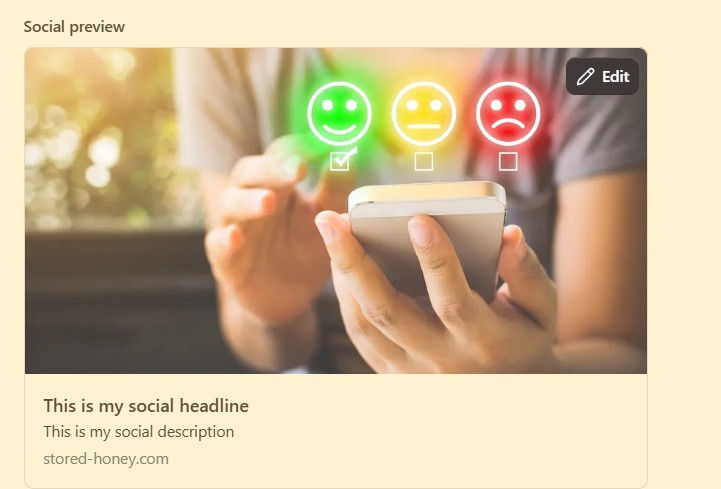
Social preview feature in Substack
To edit the social headline, social description or image, click 'edit' or tap on the image. You can select a different image from those in the post from the options below.

Analytics: You won't be able to dive very deeply with the data provided by Substack - although there is an option to integrate external analytics platforms - but there's plenty of useful information in there that you should be looking at regularly.
Under Audience on the left hand menu of your dashboard, you'll find three sections: Subscribers (your list of emails), Growth and Stats. Most useful under Growth is 'new subscribers' - knowing how they are reaching your content and signing up enables you to put more effort into the things that are already working.

Example total traffic graph in Substack Click on Stats and you're given a long list of options to look at. Among them, Traffic shows you where your audience is coming from - and opportunities to improve. If you are hardly getting any traffic from search engines, you should look at improving your SEO. The Posts tab shows you the average open rate for the past 30 days and how it compares to the previous month - it's worth keeping an eye on this in case to ensure it remains steady (or even better - increases), as well as the number of views and engagement rate per post. Use this to spot trends in the sort of content your readers are enjoying - and what they are less interested in.
Finally, Surveys is where you can find data from any surveys you have embedded in a post (this is a quick and no-cost way to find out more about your readers).
Chat: This one comes with a caveat. It can be very hard to get a conversation going in your chat if you have a small number of subscribers - especially if you have set it to be only available to paid subscribers. The best way of building an audience via Substack chat is to interact with other people's messages - like them if you appreciate what they are saying but don't have anything in particular to add, reply if you want to keep the conversation going.
Focus on accounts that chime with yours - from the same geographical area, cover similar subjects or have audience crossover (the Audience option under the Stats section of your dashboard shows you these).

Recommendations panel on Substack Recommendations: One of the strengths of Substack is its community. As well as the Chat feature above, you can more prominently show your support for other creators - and ask others to show theirs - through Recommendations. These appear on your homepage. The simplest way to add or edit them is to go to your homepage, find the Recommendations panel and click 'manage'.
You can approach users whose audience crossovers with yours to suggest a collaboration where you each recommend the other.
If you would like more insights, tips and resources, subscribe to our newsletter:
By entering your details, you agree to receive the Raised Voices newsletter as well as marketing emails about workshops, resources, and services. You can unsubscribe at any time by clicking the link in the footer of the emails. Your information will be stored securely and never shared with third parties.


Comments